
How to Reset/ Pattern Unlock Samsung Galaxy A12 Without Password
A step-by-step guide with screenshots on how to reset the Samsung Galaxy A12 if you have forgotten the PIN/Pattern/Face/Screen lock password. You might also be planning to sell your phone, or experiencing an issue after an update, and need to wipe data factory reset, then this is a perfect guide for you.
A factory reset will erase all data on your phone, including contacts, messages, Whatsapp data, photos, application data, and other media content stored on the internal storage. It is therefore highly recommended to backup your important data. (We also have method without losing data but that might be a bit complicated for some beginners).
What you’ll learn:
- Unlock your phone using Hard Reset method
- Factory Reset to default settings
- Install Custom TWRP Recovery
- Factory Reset without losing data
Forgot Password, Pattern or PIN? Unlock Samsung A12 using Hard Reset
Hard reset is different from Factory Reset, because it is done through Android recovery mode. Hard reset can be useful in case you’ve forgotten patter lock on your phone and there is no way to get into phone settings.
When you wipe data factory reset through Android recovery, it triggers FRP lock on your device. Right after rebooting your device, it will ask you to verify your account. You must add the Google account that was previously synced on the device If you don’t remember the account, then follow the latest guide to bypass the Google account on the Galaxy A12 without using a computer.
When your phone is screen locked, you won’t be able to power off your phone, like you normally do when it is unlocked. It will ask you to enter or draw pattern to turn off phone. So to restart your phone you need to press and hold Volume down+Power buttons simultaneously, a few seconds later screen turns black. As you see it turns black, immediately leave Volume down and hold Volume up key to boot into recovery mode. See more detailed instructions below.
- Reboot your phone using Volume down+Power
- Once the screen turns black, leave Vol down and press Volume up with Power button for at least 5-10 seconds.
- Use Volume up and down to navigate between options and Power button to choose an option.
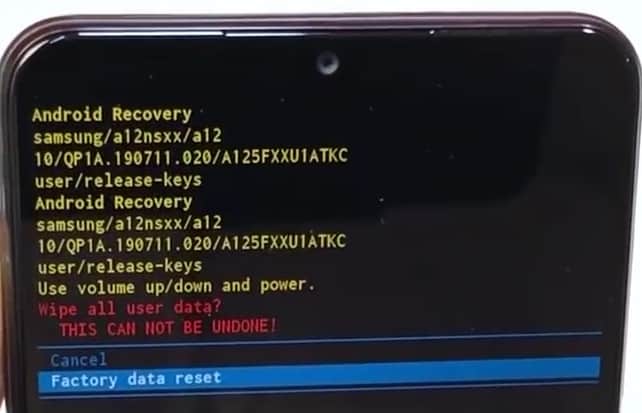
- Now select Wipe data/ factory Reset. You’ll get a warning as mentioned earlier,

If your phone is reset, you may need to enter the Google account information (email address and password) associated with this phone to be able to use it again. - It will ask for confirmation, wipe all user data? Select Factory data reset.

- That’s it, now reboot your Galaxy A12.

Factory Reset
Follow these steps to factory reset a Samsung A12. These instructions are for devices running Android 11 One UI 3.1 & lower versions. If you’ve added a Samsung account to your device, it may ask for Samsung account password so make sure you already know the password.
These instructions are for users who have already full access to the device phone Settings, if you have forgotten the password then follow the above instructions, where you need to use Android recovery.
- Tap on the Settings app on your device.
- Scroll down and find Device management
- Tap on Reset
- Tap Factory Data Reset
- Scrolling down the page, tap Reset
Samsung A12 TWRP Recovery
Samsung A12 runs stock Android recovery but it comes with limited options & features. TWRP is custom Android recovery that you can use for more advanced options like flashing rooting files, custom kernels, zip files like Gapps and could also be used to make full back of your device to save your important data without losing before a factory reset.
To install TWRP recovery on A12 you need a Windows computer, TWRP image and Odin software to flash it.
Above links will help you download all the required files and how to flash it using Odin3.
Factory Reset without losing data
Here are the instructions if you’ve important data on your Samsung A12 and you don’t want to lose data but want to reset your phone at the same time. Is it possible, yes 80% chances are you can recovery all of your phone data stored on internal storage.
- Install TWRP recovery on your phone.
- Boot your phone into TWRP recovery using Vol up+Power keys
- Connect your phone to PC
- While in the custom recovery mode, your phone data will be shown in Windows explorer.
- Open the folder and copy all the important data.
I hope you find this useful. For tips and guides don’t forget to follow our YouTube channel.

